


Coinbase Wallet: Trade to Win
4.014.16K Reviews
App Specs
- Version
- 30.13.0
- Updated On
- License
- Free
- Downloads
- 10,000,000+
- Developer
- Coinbase Wallet
- Categories
- Finance
- Platform
- Android, iOS
Screenshots
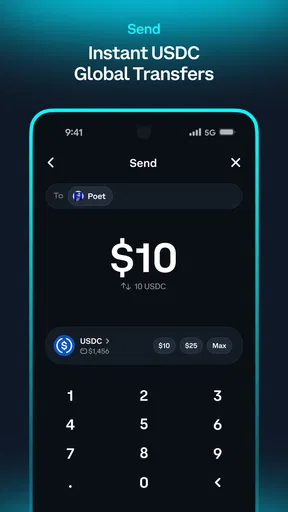
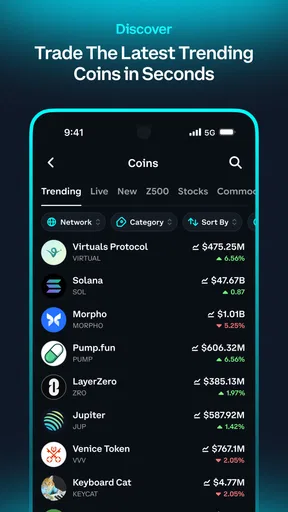
 Analysis by AppCompare
If you are new to crypto and want a wallet that feels more like a practical mobile tool than a trading terminal, Coinbase Wallet is an approachable place to begin. I found its main appeal in the way it puts onchain assets, transfers, and earning options in one app, while still leaving the user responsible for understanding what each action means. That last part matters: this is a finance app, not a savings account, and a smooth interface does not remove the risks of crypto.
The app is free, aimed at Everyone, and developed by Coinbase Wallet. It has been available since September 19, 2017, and its Android listing shows over 10 million installs, a 4.0 average from roughly 134 thousand ratings, and about 14 thousand written reviews. Those figures suggest a widely used product, but they should not be mistaken for a guarantee that every transfer, token, or network will feel equally simple.
What to expect before you make your first move
My first useful distinction is between Coinbase Wallet and a conventional bank or exchange account. The wallet is designed to give you control over onchain assets and transactions. That makes it useful for holding, sending, trading, and interacting with crypto, but it also means that a wrong address, an unsuitable network, or an accidental approval can create a problem that a normal card payment usually would not.
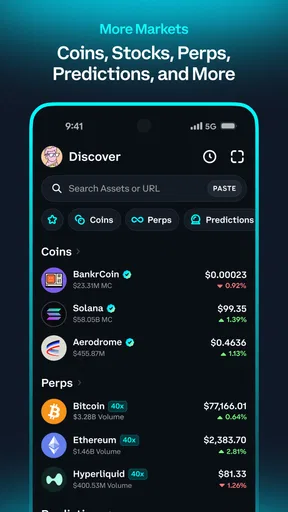
The app’s central experience revolves around your wallet rather than a traditional balance in a single currency. You can work with a broad range of assets, and the store positioning emphasizes buying, trading, sending, and earning on USDC and other crypto. In practice, I would treat those capabilities as separate jobs. Buying is about getting an asset, sending is about moving it, trading is about exchanging it, and earning is about accepting a different kind of risk in return for a possible return.
That separation helps prevent a common beginner mistake: assuming that every asset behaves like cash. Crypto prices can move, network charges can vary, and an asset that appears in the same interface as another may have very different liquidity or practical uses. Before tapping a confirmation button, I check the asset name, the amount, the destination, and the network. This small routine is more valuable than trying to memorize every term in the app.
Coinbase Wallet is a good fit if you want to explore self-custody, use onchain services, or keep a mobile wallet for occasional transfers. It is less suitable if your only goal is to buy crypto and leave it untouched with the least possible responsibility. In that case, a conventional exchange account or a regulated financial product may feel more familiar, although those alternatives come with their own trade-offs.
I also would not choose it as a casual “try anything” wallet for money I cannot afford to lose. The app makes access convenient, but convenience can encourage quick decisions. I recommend starting with a small amount that is genuinely disposable, learning the transfer flow, and only then deciding whether the broader features belong in your everyday financial routine.
Worth Reading Before You Choose

Flipboard Shows What News Apps Must Do Beyond the Feed

Switching to Android Auto Means Rethinking Your Driving Routine

Google Calendar Makes a Crowded Week Easier to Manage

Ludo King Makes the Most of the Minutes Between Plans

Baby Panda World Brings Quick Play to Modern Phones, but Its Game Library Feels Busy

ESPN’s Live Game View Makes Following Close Games Easier
How the app feels on a first visit
The current Android version is 30.13.0 and supports Android 7.0 or later. On a compatible phone, the first impression is that the wallet is built around action: view assets, obtain crypto, move it, exchange it, or explore earning possibilities. That is helpful when you already know what you want to do, but a newcomer may still need to pause over terms such as network, gas, address, and recovery information.
One detail I appreciate is that the app does not need to be useful only for frequent traders. A person might install it to receive a payment, move a small amount to another wallet, or experiment with an onchain service. The strongest experience comes when you arrive with one clear purpose. Trying to understand every asset and option at once makes the interface feel more complicated than it needs to be.
Setting up the wallet without creating avoidable trouble
During setup, I would slow down at the point where the app establishes access to the wallet. Treat the recovery information as the key to the wallet, not as a routine registration detail. I would never store it in a public note, send it through a chat, or photograph it casually. A person who obtains it may be able to control the assets, so the safest practical approach is to keep it offline and private.
This is also the moment to decide whether the wallet is for personal use, a small learning balance, or a larger long-term holding. I prefer separating those purposes. A small mobile wallet used for experimentation can limit the consequences of a mistaken approval or an unfamiliar service. Keeping every asset in the same place may be convenient, but it gives one error a much wider impact.
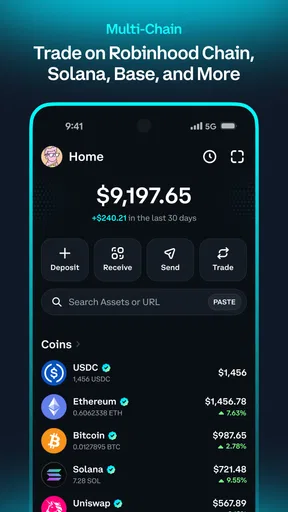
After setup, take a few minutes to identify the main account view and the transaction history before adding funds. I find this simple orientation step surprisingly useful. When money arrives later, you will know where to verify it instead of relying on a notification or a message from someone claiming to have sent it.
Security habits matter more here than decorative customization. Use a strong device lock, avoid entering recovery information where another person can see it, and be suspicious of anyone asking you to “verify” the wallet by sharing secret words. The app can provide the interface, but it cannot make a secret safe after you disclose it.
The safest way to make a first meaningful success
For a first successful action, I recommend receiving a small test amount rather than immediately attempting a complicated trade. Ask the sender to confirm the exact asset and network before anything moves. Then compare the receiving details carefully and wait for the transaction to appear in the wallet. This teaches you how an incoming transfer looks without adding the extra decisions involved in buying, swapping, or earning.
If you are sending instead, begin with a small test transfer. Copying an address is convenient, but I still compare its beginning and ending characters and confirm that the destination supports the same asset and network. A wallet address is not like an email address where a typo might produce a bounce message. The transaction may simply go somewhere you cannot recover it from.
Once the test arrives, check the activity record rather than assuming that a successful-looking screen means the process is complete. Network activity can take time, and a displayed balance can be easier to understand when you also know which asset and network were involved. This is one of the most useful beginner workflows because it creates confidence through verification rather than guesswork.
Buying crypto can be a reasonable next action if you want to fund the wallet, but I would not make it the first lesson. A purchase combines payment choices, asset selection, price movement, and the later question of where to store or use the funds. First learning to identify an asset and confirm a transfer gives you a clearer foundation.
Why trading and earning deserve separate caution
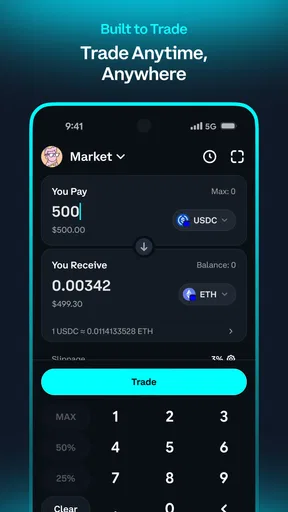
The trade function is attractive because it reduces the number of steps between one asset and another. That does not mean every swap is equally good value. I look beyond the quoted amount and consider the network cost, the asset I will receive, and whether the transaction is appropriate for the amount being moved. A small trade can be disproportionately affected by costs or price movement, so I avoid treating the preview as a guaranteed final result.
Earning on USDC or other crypto may sound closer to interest than to a market activity, but I would not make that assumption. Before using an earning option, I want to understand what produces the return, whether the funds remain immediately available, and what risks are attached to the underlying arrangement. A displayed opportunity is not the same thing as a protected bank deposit.
My practical rule is to keep experimentation and essential money separate. If I am testing a trade or an earning feature, I use an amount whose loss would not affect rent, bills, or emergency plans. That may sound conservative, but it lets the app remain a learning tool instead of turning a confusing screen into a financial emergency.
Confusing moments that can catch new users
The biggest source of confusion is usually the word “balance.” A wallet may show an asset, but that does not automatically mean it can be sent on every network or exchanged in every way. Asset names can look similar, and network selection is not a cosmetic setting. I always read the complete transaction preview and avoid proceeding when the asset or network is unclear.
Fees are another point where expectations can go wrong. The amount you intend to send may not be the amount that leaves the wallet, and a swap may involve costs that are easier to overlook when focusing only on the exchange rate. I check the final preview before approving anything, especially when the transaction is small.
Another common misunderstanding concerns wallet control. The app’s name may feel familiar to people who know Coinbase, but a wallet should still be treated as a place where access and transaction responsibility matter directly. I would not assume that a support message, social-media account, or website using the Coinbase name is legitimate. Never share recovery information or approve a transaction simply because someone says it is required to unlock funds.
There is also a difference between seeing a token and being able to use it comfortably. A token may appear in the wallet, yet its network, liquidity, or supported actions may make it impractical for a beginner. I prefer starting with an asset and workflow I understand rather than chasing every unfamiliar item that appears in the interface.
If a transaction seems stuck, my first response is not to repeat it immediately. I review the activity details, confirm the destination, and check whether the issue is a pending network action or a misunderstanding about the displayed balance. Repeating a transaction can create a second problem when the first one was merely delayed.
Where it differs from the usual alternatives
Compared with leaving crypto on a centralized exchange, Coinbase Wallet gives the wallet experience a more direct onchain character. That is valuable when you want to send assets to your own address or interact with services beyond a simple buy-and-sell screen. The trade-off is that the user has more responsibility for recovery information, addresses, networks, and approvals.
Compared with a hardware wallet, it is more convenient for mobile access and smaller everyday experiments. A hardware device can be a better choice for someone holding a substantial long-term balance and willing to accept extra setup friction in exchange for keeping signing activity away from a phone. I see the two approaches as serving different jobs rather than as direct replacements.
Compared with a basic payment app, this wallet offers a broader crypto workflow but demands more attention. Someone who only wants to make familiar local payments may find a normal banking or payment app easier. Someone who wants to explore onchain assets will likely appreciate the flexibility here, provided they are prepared to learn the safety rules.
The next step after your first transfer
Once I had confirmed a small transfer, I would choose just one direction: buying, trading, sending, or exploring earning. Keeping the next step narrow makes it easier to understand what changed. Write down the asset, network, purpose, and approximate amount before acting. That short note creates a useful record when several assets begin appearing in the wallet.
I would also review the activity history regularly. It is not merely a receipt archive; it helps connect an action with its result. If you cannot explain why an entry exists, pause before making another transaction. This habit is especially helpful when using the app across several services or when returning after a long break.
For everyday use, a realistic scenario might be receiving a small crypto payment from a friend. I would confirm the asset and network with that person, receive the amount, verify the activity record, and leave it untouched until I understood the next purpose. If I later needed to send part of it, I would make a small test transfer first rather than assuming that a previously successful receipt proves every network choice is correct.
Another sensible use is keeping a modest amount available for onchain activity while storing larger holdings differently. This limits the damage from an accidental approval, a compromised phone, or a rushed decision. It also keeps the app’s convenience in perspective: a mobile wallet is excellent for access, but access should be matched to the amount and risk you are comfortable managing.
My final view is positive but careful. Coinbase Wallet is a capable free finance app for people who want direct control over crypto and are willing to learn the details behind each transaction. Its broad reach, mature presence, and practical combination of wallet, transfer, trading, and earning tools make it worth considering. The best first win is not making a fast trade; it is completing one small, fully understood transaction safely.
I would recommend it to a curious beginner who follows the setup steps slowly, protects recovery information, and starts with a limited balance. I would steer away from it for anyone looking for a hands-off savings product, guaranteed returns, or a way to avoid learning about networks and transaction risk. Used with that distinction in mind, Coinbase Wallet can turn a confusing first encounter with onchain finance into a manageable sequence of small, verifiable steps.
Pros
- Self-custody gives you full control over private keys and assets.
- Supports a broad range of tokens
- networks
- and decentralized applications.
- Built-in browser makes accessing DeFi and Web3 services convenient.
- NFT management and viewing are integrated directly into the wallet.
- Available across mobile platforms with a clean
- beginner-friendly interface.
Cons
- Losing the recovery phrase can permanently lock you out of your funds.
- Network fees can be confusing and expensive during periods of high demand.
- Some assets and features may vary by country or supported blockchain.
- Scam tokens
- phishing links
- and risky dApps require constant user caution.
- Advanced trading and DeFi functions may feel overwhelming for newcomers.
FAQs for Coinbase Wallet: Trade to Win
What is Coinbase Wallet: Trade to Win, and how does it differ from the Coinbase exchange app?
Coinbase Wallet: Trade to Win is a self-custody cryptocurrency wallet that lets you store, send, receive, swap, and interact with digital assets and decentralized applications. Unlike the main Coinbase exchange app, the wallet generally gives you control of your private keys and recovery phrase. This also means you are responsible for protecting access, approving transactions, and understanding network fees before confirming activity.
Is Coinbase Wallet: Trade to Win safe to use for storing cryptocurrency?
The app includes security features such as wallet encryption, biometric or passcode access, and recovery-phrase protection, but no self-custody wallet can remove every risk. Your recovery phrase is the master key to the wallet, so it should never be shared, photographed, or entered into an unfamiliar website. If someone obtains it, they may be able to take your assets permanently.
Can I buy or trade cryptocurrency directly inside Coinbase Wallet?
Depending on your country, supported assets, and current app availability, Coinbase Wallet may provide options to buy, swap, or trade cryptocurrencies through integrated services and decentralized exchanges. Prices, payment methods, token availability, and fees can vary. Before confirming a transaction, carefully review the quoted exchange rate, network fee, service charge, and the final amount you will receive.
What fees should I expect when using Coinbase Wallet: Trade to Win?
Using the wallet can involve several types of costs, including blockchain network fees, swap or trading spreads, third-party provider charges, and possible purchase fees. Network fees are paid to process transactions and may rise when a blockchain is busy. The exact cost depends on the network and transaction, so review the confirmation screen carefully before approving anything.
What happens if I lose my phone, forget my password, or lose my recovery phrase?
A phone replacement or forgotten app passcode may be recoverable if you still have the correct wallet recovery phrase and follow the official restoration process. However, Coinbase generally cannot recover funds from a self-custody wallet if the recovery phrase has been lost or stolen. Store the phrase offline in a secure location, and ignore anyone who asks you to provide it for support.


